Spicy Chat AI App: How to Download on Android, iOS & Web (2026)
SpicyChat AI's Android app (version 1.0.79) and iOS app (version 1.0.72) are both available for download right now — ending the era when SpicyChat was web-only and forcing mobile users into a browser. This guide walks through every download method, explains what's different between the app and web experiences, and covers the most common problems people run into after installing.
Is There a SpicyChat AI App?
Yes — SpicyChat AI now has native apps on both major mobile platforms. For the first two-plus years of SpicyChat's existence (2023 to mid-2025), the platform was web-only. Users accessed it through mobile browsers, which worked but lacked push notifications, optimized touch controls, and the general feel of a native app.
Native apps launched in 2025 and have been updated regularly since. The Android app reached version 1.0.79 and the iOS app reached version 1.0.72 (updated February 2026). Both apps are available in their respective official stores with no workarounds required.
How to Download SpicyChat AI on Android
Installing SpicyChat AI on Android takes about two minutes through the Google Play Store:
- Open the Google Play Store on your Android device.
- Tap the search bar and type "SpicyChat AI".
- Look for the app by NextDay AI — the package name is ai.nextday.mobile.android.spicychat.
- Tap Install and wait for the download to complete (the app is under 50MB).
- Open the app, sign in with your existing SpicyChat account or create a new one.
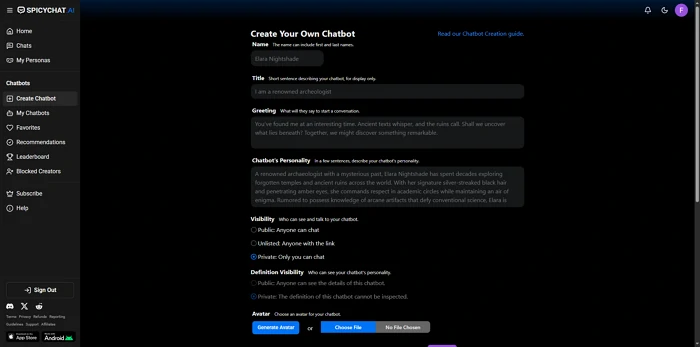
- Go to Settings to configure your content preferences including the NSFW toggle.
Requirements: Android version 7.0 or higher. The app is compatible with most Android phones made after 2017.
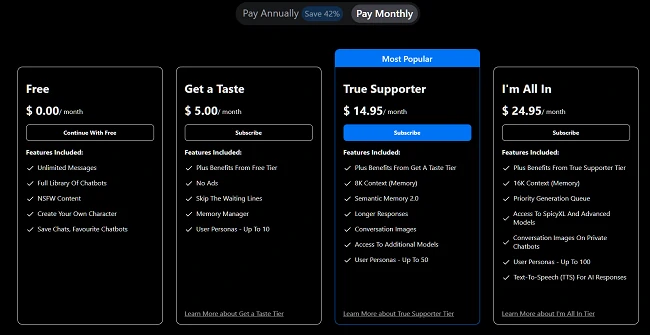
In-app purchases: The Android app offers alternative subscription pricing compared to the website. A weekly plan runs $9.99 and an annual plan runs $29.99. The annual in-app price is notably cheaper than subscribing monthly through the website ($5-$24.95/mo depending on tier).
How to Download SpicyChat AI on iOS
Installing on iPhone or iPad follows the standard App Store process:
- Open the Apple App Store on your iPhone or iPad.
- Tap the search icon and type "SpicyChat AI" — the full listing name is SpicyChat AI: Roleplay Chat.
- Tap Get (or the download cloud icon if you've installed it before).
- Authenticate with Face ID, Touch ID, or your Apple ID password.
- Wait for the download to complete, then open the app.
- Sign in with your existing credentials or register a new account.
Current version: 1.0.72, updated February 2026. Check the App Store listing for the most recent version — updates typically release monthly.
Device requirements: The app is compatible with iPhone models running iOS 15 or later. iPad support is available, though the interface is optimized for phone screens.
Using SpicyChat AI on Web (Browser)
You do not need the app at all. SpicyChat AI's website at spicychat.ai is fully responsive and works well on mobile browsers. For many users, particularly those on desktop computers, the web version is the primary access method.
To use on mobile browser: Navigate to spicychat.ai in Safari, Chrome, or any modern browser. The layout adapts to smaller screens automatically. You can bookmark the site or add it to your home screen for quick access.
Adding to home screen (PWA-style): On iOS Safari, tap the Share button and select "Add to Home Screen." On Android Chrome, tap the three-dot menu and select "Add to Home Screen." This creates a shortcut icon on your home screen that opens the site in a full-screen browser window, similar in feel to a native app.
Web vs. app: The feature sets are identical — there's no content exclusive to one version over the other. The native apps offer push notifications, which the browser cannot provide without background permissions. Otherwise, the experiences are comparable.
Ready to explore? SpicyChat AI offers free access to 138K+ characters.
Start Chatting Free →SpicyChat AI on now.gg
now.gg is a cloud gaming platform that streams Android apps directly to your browser without requiring any installation. It acts as a remote Android device — you view and interact with the app through your browser while now.gg's servers run it on actual Android hardware.
To use SpicyChat AI via now.gg:
- Visit now.gg in your browser.
- Search for "SpicyChat AI" in the now.gg app library.
- Click Play — the app streams to your browser window.
- Sign in with your SpicyChat credentials.
Why use now.gg? Two main use cases: (a) If you have a device that cannot run the native app — older Android versions, iOS users who want the Android app experience, or desktop users who prefer the mobile interface. (b) If you want to try the mobile app before downloading it.
Cons of now.gg: Slightly higher latency than a native install because data must travel through now.gg's servers. Requires now.gg account creation. Streaming quality depends on your internet connection. For regular daily use, the native app or web version is preferable.
SpicyChat AI Mod APK — Warning
Searches for "SpicyChat AI mod APK" and "SpicyChat AI premium unlocked APK" are common. These files claim to offer SpicyChat's premium features — larger context windows, SpicyXL model access, unlimited personas — without paying for a subscription.
Do not download mod APKs. The risks are significant and real:
- Malware. Mod APKs are distributed through unofficial websites and are a primary vector for Android malware. A file claiming to unlock SpicyChat premium could also be installing a keylogger, banking trojan, or adware on your device.
- Data theft. Your SpicyChat login credentials entered into a modded app go to whoever created the mod, not SpicyChat's servers. Your email and password are compromised.
- Account ban. SpicyChat detects modified clients and bans accounts associated with them. You lose access to any characters, settings, and conversation history tied to that account.
- No actual benefit. The "premium unlocked" claims in mod APK descriptions are often simply false — the app looks like it has premium features but the backend server restrictions still apply.
Legitimate free alternatives: The official free tier at spicychat.ai includes unlimited messages, which is more than most competitors offer for free. If the free tier limitations frustrate you, the $5/month "Get a Taste" plan is the lowest-risk upgrade.
App Features vs Web Experience
| Feature | Native App | Web Browser |
|---|---|---|
| Push notifications | Yes | No (without background permissions) |
| Home screen icon | Native (auto) | Manual (add to home screen) |
| Touch optimization | Optimized | Good (responsive) |
| Offline access | No (requires internet) | No (requires internet) |
| All content features | Yes | Yes |
| Account sync | Yes | Yes (same account) |
| In-app purchase pricing | Different ($9.99/week, $29.99/year) | Website pricing ($5-$24.95/mo) |
| Load speed | Slightly faster | Depends on browser |
| Update required | App Store/Play Store | Automatic (browser) |
The most meaningful difference for budget-conscious users is the in-app pricing: the annual plan at $29.99 through the app is cheaper than subscribing month-to-month at the web prices. If you use SpicyChat regularly enough to subscribe annually, the app is the cheaper purchase channel.
Ready to explore? SpicyChat AI offers free access to 138K+ characters.
Start Chatting Free →Why Is SpicyChat AI Not on the App Store?
This question appears in searches, but the premise is outdated — SpicyChat AI is available on the App Store (iOS) and Google Play (Android) as of 2025-2026.
Before the native apps launched, users couldn't find SpicyChat on app stores because it didn't exist there — it was web-only. Some forums still circulate this outdated information.
If you searched and genuinely cannot find it, two possibilities: (a) You are in a region where the app listing has been restricted — app store availability for adult content apps varies by country. (b) The listing name matters: search "SpicyChat AI" (not "Spicy Chat AI") for the best results.
App store content policies do affect NSFW apps. Google Play and Apple App Store require apps to comply with their content policies, which means the SpicyChat app available in stores has restrictions that may differ from the web version. NSFW content settings and explicit content visible in the apps are subject to app store policy compliance, which is typically more restrictive than what the web version allows.
Troubleshooting SpicyChat AI App Issues
App Not Loading / Black Screen
If the SpicyChat app opens to a black screen or spinning loader that never resolves: first check your internet connection, then force-close the app and reopen it. If the issue persists, clear the app cache (Android: Settings > Apps > SpicyChat AI > Storage > Clear Cache). On iOS, uninstalling and reinstalling the app clears cached data.
Login Not Working
Login issues typically have three causes: (a) Wrong password — use the "forgot password" flow on the website, not the app, as email recovery is more reliable. (b) Server-side issues — check SpicyChat's Discord server for maintenance announcements. (c) Account flagging — if your account was flagged for policy violation, login may be blocked.
App Keeps Crashing
Update to the latest version first — many crash bugs are fixed in subsequent releases. If crashes persist on the latest version, the issue is likely device-specific. Try uninstalling, restarting your device, and reinstalling. If the problem continues, the SpicyChat Discord community often has device-specific workarounds.
Messages Not Sending
The send button stopping mid-session is a known bug cited in user reviews. Workarounds: refresh the page or restart the app, switch to a different character and back, or clear the browser/app cache. If the problem is consistent rather than intermittent, check whether it correlates with the server queue — during peak hours, the free tier encounters waiting queues that can look like a broken send button.
For ongoing outage-related issues, see our SpicyChat troubleshooting guide.
FAQ
Yes. The SpicyChat AI app is free to download on both Android (Google Play) and iOS (App Store). The app itself has no purchase price. Within the app, you access the same free tier as the website — unlimited messages, 3 personas, 4K context window, with ads and occasional waiting queues. Paid subscriptions can be purchased in-app at $9.99/week or $29.99/year, which differs from the website subscription pricing.
Functionally, yes — both access the same SpicyChat AI platform with the same characters, features, and account. The differences are in interface optimization (the app is touch-optimized), push notifications (app-only), and subscription pricing (in-app pricing differs from website pricing). There is no exclusive content in either version.
Yes. Your SpicyChat account is the same across all platforms. Characters you create, conversation history, subscription status, and persona settings are all synced. Log in with the same email and password on any device.
App crashes most commonly result from an outdated app version, insufficient device storage, or a device with less than 2GB RAM. Update the app first, free up storage space, and restart your device. If crashes persist, clearing the app cache (Android) or reinstalling (iOS) resolves most cases. Some device-specific crashes are reported for older Android devices running the app in low-memory mode.
There is no dedicated desktop application. SpicyChat AI on desktop means using the web version at spicychat.ai in a browser. The web version is fully functional on desktop and is the preferred access method for desktop users. The mobile apps are specifically designed for Android and iOS devices.